Blog

  • Find a happy place

    Find a happy place

    There are certainly more stressful jobs than being a software developer.  Still, there are unique pressures that come with the territory when working to ship a product, support a product, or (in my case) serve a client and their systems.

    Let’s face it, when dealing with technology, or sometimes end users, we can often feel like Peach from Finding Nemo under attack from Darla.

    Finding your own happy place is an important part of being a successful worker, developer, parent, and person.

    Stress management comes in all forms.  For some it is a quiet space, a book, and hot tea.  For others it may be an intense workout at the gym.  Still others may find a simple walk around the office park to be enough to clear the mind and refresh one’s thinking.

    For me, it is lunch by the lake.

    Near my office is a country club that has a lake.  Along that lake is a road.  And along that road I will park my car and eat my lunch.

    MacGregor Downs lake

    Sitting by the lake gives me a chance to get perspective.  Whatever broken code or failed install or bizarre client request befalls me is safely tucked back at the office.  Across the lake I can see people playing mid-day tennis.  Around the corner, a lucky few are teeing off in their round of golf.

    The lake is a reminder that there is more to life than work.

    Coming to and from the lake is a motivator, as I pass by country club homes with luxury sedans parked in their driveways.  I believe working hard will reap benefits, and pressing on through whatever the day’s stress may be will inevitably teach me something.

    What is your happy place?  Do you go there often enough?

  • Replaceable parts and software design

    Replaceable parts and software design

    This past weekend I replaced the brake pads and rotors on my car.  It took a couple hours, cost about $90 in parts, and left me not just with a sense of achievement and personal satisfaction, but a with lots of thoughts about how mechanical systems work, how standardization should function, and how these things translate into the world of software design and development.

    brakes

    The aftermarket auto parts industry is huge.  In my area, there are at least 3 national brand auto parts retailers.  They stock thousands of parts for hundreds of makes, models, and versions of automobiles.  They can do this because of standards.  A brake pad for my vehicle can be made by aftermarket manufacturers because they can develop against a standard, ensuring the part will fit and perform as expected in my car.  Most of these aftermarket brands boast how they “meet or exceed the original equipment manufacturers standards…”

    As an end user of my vehicle, if I am so inclined, I can perform the task of replacing worn out parts with new parts.  I can do this in many cases without any particular training or expertise, or the need for specialized tools.  I simply dismantle and remove the old part, and install the new part.  And most of the time, it just works.

    But when was the last time an end user could replace a broken block of code with a different block from another manufacturer?  

    Never?  Rarely?  Oh, silly man, that’s not how software works!

    I concede, a hunk of metal is a lot different than code that can contain logical or programmatic errors.  If the metal wears out or doesn’t perform, we just cast another one and put it in its place.

    There are a few key points that emerge in this discussion.

    • Ownership versus Licensing
    • Open versus Closed Source
    • Software aging and reuse

    Ownership vs. Licensing

    When I purchase an automobile, I (or the bank) own it outright.  There may be a manufacturer’s warranty in force, but the manufacturer has no claim to the tangible asset.  It becomes my property, and I am largely free to do with it what I want.

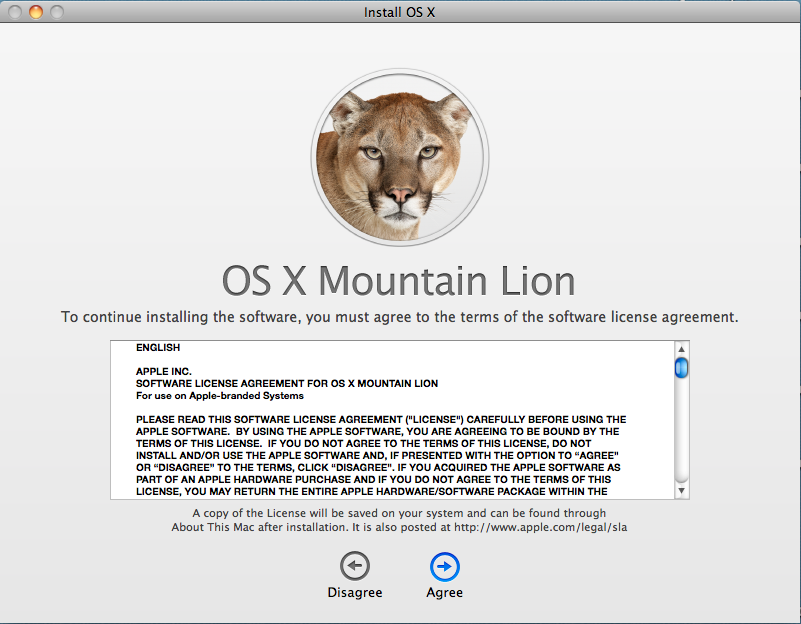
    Software is a different animal because it is a licensed product.  In the majority of cases, what I buy when I purchase a piece of software is permission to use the product, not the product itself.  For example, here is the first clause from the OS X Mountain Lion license agreement (emphasis mine):

    1. General.
    A. The Apple software (including Boot ROM code), any third party software, documentation,
    interfaces, content, fonts and any data accompanying this License whether preinstalled on
    Apple-branded hardware, on disk, in read only memory, on any other media or in any other form (collectively the “Apple Software”) are licensed, not sold, to you by Apple Inc. (“Apple”) for use only under the terms of this License. Apple and/or Apple’s licensors retain ownership of the Apple Software itself and reserve all rights not expressly granted to you.

    Thus, by agreeing to the license, I have no right or authority to modify, enhance, customize or otherwise repair the code.  I must take it as is, trusting that it will work as expected.  If it doesn’t, I am at the mercy of the producer to deliver a patch.  Otherwise, I’m stuck.

    (Note: for a far more educated perspective on this topic, I recommend the Freedom to Tinker blog by Princeton University professor Ed Felton.)

    Open Source vs. Closed Source

    The advent of Open Source software in the late 1990s challenged this traditional form of licensing by opening up the ability to view, change and customize the code covered by the license.  Still, most commercial software is closed source and tightly guarded by its licensing terms.  My ability to modify the functionality of the product is limited to the configuration settings or integration points exposed by the creator.

    Software Aging and Reuse

    Generally speaking, software doesn’t wear out.  The code written 10 years ago, given a suitable runtime environment, should still work.  A one is still a one, and a zero is still a zero.  Unlike my brake pads, which degrade every time they are used (albeit ever so slightly), software code does not break down with each subsequent execution (unless of course it was designed to do so.)

    Most software improvements and future versions are created to add features and repair bugs.  In some cases, producers may rewrite products from the ground up in order to take advantage of the available tools, hardware specs, and methodologies that are in play at the time.  But the old code, left as is, doesn’t stop working just because it is old and has been used repeatedly.

    So if software doesn’t wear out and is not mine to modify, is there a comparison to the replaceable parts of my car?  I still think so.

    Designing for change

    Software in its own way is purposefully rigid.  You want it to do one thing well.  Until you don’t.  At that point you want the flexibility to make it behave differently.  And if you are so inclined, you’d love to do it yourself.

    Not all products do this because designing in that kind of flexibility takes more time, costs more money, and requires more effort.

    The best example I know of such a product is the very tool I am using to share these thoughts.  WordPress has a pretty amazing capacity to accept add-ons from 3rd party developers.  As an end user, if I want my blog to have advertising, or my Twitter feed, or be an ecommerce site, I don’t have to wait until the WordPress creators add these features as officially sanctioned behaviors.  I simply add a plug in.  If the first one (or ten) I check out don’t do it the way I want, I have more to select from.  If all else fails, I can write my own.

    The internet browser is another class of software that is becoming more modular.  Whether they are called ‘add-ons‘ or ‘extensions‘ or ‘accelerators‘, they all serve to let me as the end user tweak and adjust how the product works.

    Perhaps these plug-ins are more akin to putting a new stereo in my dashboard to replace the factory installed unit than they are to replacing a worn component.

    Designing modular, extensible software can be a challenge.  I believe though that there are certain advantages to do so, particularly for consumer products.  Now it’s time to press software creators for more of that freedom.

  • Upgrading to OS X Mountain Lion

    Upgrading to OS X Mountain Lion

    I’ve decided to roll the dice with my first Mac OS X upgrade.  The real motivation is not any disappointment with version 10.6.8 but a desire to purchase Keynote, which requires OS X 10.7.4 or later.

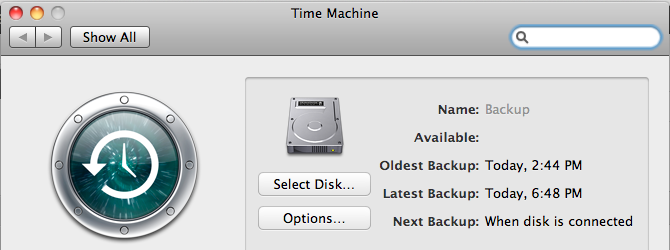
    First, I used Time Machine to make a full disk backup to a USB drive.  I have a 250GB drive in my Mac, and Time Machine picked up about 180GB.  It took roughly 12 hours to initialize Time Machine and get all that data copied.

    Time Machine

    Next comes purchasing OS X Mountain Lion from the App Store.  I swear, spending money is way too easy.  But the $19.99 purchase price is quite reasonable (compared to $119.99 for Windows 8). As soon as the App Store purchase goes through, the download begins.

    Mountain Lion Download

    The full download is stated to be 4.4GB.  It took roughly 90 minutes to complete, and the installer launched automatically.

    Welcome page.

    ML Install

    Terms and Conditions

    Terms and Conditions

    Select Destination Drive
    ML Destination

    Start Installation

    ML Installing

    After this initial unpacking, a restart kicks off the main installation.  As expected, the install screens carried a certain polish to them.

    The full install phase took about another 45 minutes or so.  I then saw the new OS X Mountain Lion login screen.

    After logging in, another setup sequence followed to provide my Apple ID, accept the collection of Terms and Conditions, and elect to set up iCloud and Messaging.

    All told it was about 3 hours elapsed from start to finish.

    I will note a couple post-upgrade observations.  First, the Mail app has been upgraded, and so all of my mailboxes and their data needed to be upgraded as well.  I have several mail accounts and this process took about 30 minutes.

    Lastly, Time Machine had to kick off a new backup of about 20GB.  I’m guessing much of this is the  Mountain Lion download and unpacked files.  At first glance, it was hard to tell if my pre-upgrade backups were still valid or even available.

    Apple has done well to deliver a painless upgrade experience at a reasonable price.

  • The Internet thinks I am 5 years old.

    The Internet thinks I am 5 years old.

    In the early days of the good old World Wide Web, the emerging anonymity was often summed up with the cartoon “On the Internet, nobody knows you’re a dog.” published in 1993.

    Now, 20 years later, not only does the Internet know you’re a dog, it knows whether you’re a mutt or a purebred; whether you like rawhide or stuffed squirrels; and if Eukanuba ends up in your online cart more often than Iams.  Our digital trail is captured on every purchase, every tweet, and every wall post.

    amz-1Many online services use this history to ‘aide’ me as a consumer.  Amazon may have been the first to pioneer a robust recommendation engine based on past purchases.  But now services like Netflix, Pandora, Facebook, and even my local newspaper’s site all make attempts to pique my interest based on whatever they know about me.

    And quite frankly, they suck at it.

    It’s not that they don’t properly analyze the data.  It’s that they allow the data to be polluted.  And in my world, the biggest polluter of my digital persona is none other than my kindergartner.

    I have had a Netflix account since 2008.  I have probably watched a few hundred movies and TV episodes.  In 2010 I got a Roku, and my Netflix account became more accessible, allowing me to dial up Mythbusters or Top Gear whenever I wanted and watch on my TV.  Shortly thereafter, however, a shift occurred.  Suddenly, my recommendations started looking like this:

    nf-1and

    nf-2

    To their credit, Netflix has announced they will be introducing “personalized profiles” in the near future, undoubtedly in response to an endless stream of emails from fathers who, in fact, don’t have an interest in Tinkerbell or Babar they way Netflix thinks they do.

    My internet persona is becoming an amalgam of my entire family.  We have one Amazon Prime account, under my wife’s email.  So as far as Amazon is concerned, she not only likes theology books, but also electronics gear and tech books.  Polluted.  But why would I pay another $80 a year to have my own Prime account?

    We experience the same challenge with our recently purchased iPad.  In many ways it is a ‘family’ device, used by mom, dad, and kids alike.  But it’s my iTunes account associated with the device, so Apple is left to believe that I like Hay Day and PBS Kids as much as I like Evernote and CNBC.

    The problem of ‘householding’ isn’t new.  Just ask any direct mail business or non-profit who gets separate donations from husband and wife.  But you want to believe that we are getting better in this technological age.  Unfortunately, the progress is slow.

    While I wait, I guess I’ll enjoy another Feel Good Talking Animal show.

  • Why can’t I collapse HTML in a master page? Oh, wait, I can! (Sort of.)

    I’m going to file this one under Stupid Visual Studio tricks.

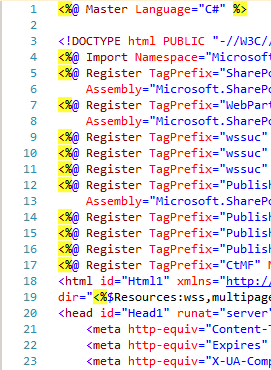
    When editing a master page file in an ASP.NET project (or in my particular case, a SharePoint solution), it came clear that the normal display of the HTML source was missing the very useful expand/collapse option.

    Exhibit 1.  Master page with no collapse

    no collapse when viewing Master Page

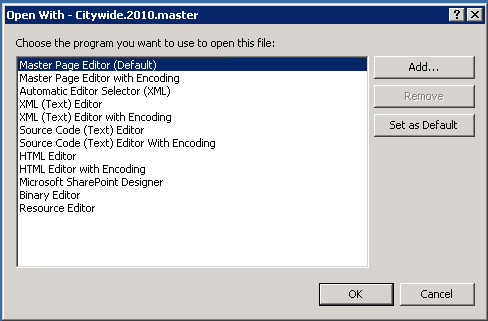
    With a hat tip to this Stackoverflow post, it appears re-opening the file and explicitly selecting the editor to use fixes this behavior, as shown below. (Note, I’m basing this on VS2010 SP1.  YMMV.)

    First, right-click on the File, and select Open With…
    open-file-with

    Then select Master Page Editor (which is probably already marked as default) and click OK.

    select editor

    Then watch your cursor spin while some Visual Studio voodoo magic happens. When the file opens, you should see the expand/collapse boxes and lines.

    master with collapse


    The epic fail part comes when Visual Studio makes you do this every time you open the file.  

    It is worth noting, however, that .aspx and .ascx pages are exempted from this bug feature.


  • How to fail your consumer.

    How to fail your consumer.

    I must be in a bit of a ranting mode this week, but I couldn’t get past this one.

    So I’m implementing a web based calendar for a client.  I decide to use a fairly normal jQuery plugin called FullCalendar.  For the most part, it works as you’d expect.

    Query a list of events.  Render a calendar, with those events displayed.

    My client’s requirement stated that when the calendar loads, show the current month.  But every time it loads, we actually were showing the next month into the future.  March became April.

    Tracing, breakpoints, quickwatches.  All the date values look correct.  But the default month never matched the current month.

    Then I figured I would RTFM and to my amazement, I found this:

    full-calendar fail

    IMPORTANT: The value is 0 based, meaning January=0, February=1, etc.

    However, the year parameter is not zero-based, meaning 2013 == 2013.

    If I had to guess, the month value might be handled in an array.  And most arrays are zero-based.  Fine.  But when you alter the basic expectation of what a value is and how it behaves, you fail your user.  You waste their time.   You’ve wasted my time and my client’s money.

    Writing code that is consumed by others requires that you think about the consumer and making their life easier, not take shortcuts to make your life easier.  

    At least I can appreciate that this peculiarity was included in the otherwise admirable documentation.  And I definitely appreciate the overall functionality of this plugin.  But I don’t appreciate creating an exception when one doesn’t need to.  It smells of laziness, and as coders we can do better.

  • For the love of Pete make your error message meaningful!

    While debugging some custom SharePoint code (not written by me, mind you) today I ran in to this little gem:

    Cannot complete this action.

    Please try again. at Microsoft.SharePoint.Library.SPRequest.MapUrlToListAndView(String bstrUrl, String bstrUrlToMap, Guid& pgListId, Guid& pgViewId)
    at Microsoft.SharePoint.SPWeb.GetListFromWebPartPageUrl(String pageUrl)
    at Microsoft.SharePoint.SPWeb.GetListFromUrl(String pageUrl)
    at MyWebPart.EventCalendars.EventCalendars.GetCalendarUrl(Uri current, Uri referrerUri)
    at MyWebPart.EventCalendars.EventCalendars.CreateChildControls()

    Microsoft is a multi-billion dollar company.  And yet, with all their resources, training, skills and expertise, they still produce an error message that says the equivalent of “I’m broken. Try pressing F5 and see if I am not broken in a few seconds.”

    Is it really that the developers of the SPRequest object in this case don’t actually know what went wrong, so they bubble up this shoulder shrug?

    Or is it that they do know what went wrong, but are embarrassed by it?  Disgusted by it?  Too polite to throw another team under the bus publicly by immortalizing them in an Exception message?

    Who knows.

    Consequences

    When a developer encounters a message like this, the clock begins to tick while a solution is sought out.  With few clues as to what went wrong, that developer has to do more work to find a suitable repair.  More work means more time, more cost, more risk in the project.

    Microsoft can be blamed for project overruns, but they can’t be held directly responsible.  Still, as a standard bearer for the industry, I think they have an obligation to demonstrate the kinds of best practices they advocate.  This error message fails that test with great glory.

    We can do better

    The takeaway lesson here is obviously that if you or your company is creating a consumable API, provide useful feedback.  There’s a little bit of the Golden Rule tied up in this as well – write exception messages for others the way you’d want them to write a message for you.

  • Studying for MS Exam 70-480

    This month I have been studying to take the Microsoft certification exam 70-480: Programming in HTML5 with Javascript and CSS3.

    The first resource I leveraged was Microsoft Virtual Academy and the freely available online video course presented by Jeremy Foster and Michael Palmero.  It did provide a cursory overview of the topics in the exam, though in the context of Windows 8 development first, with web development second.  One thing that irritated me about this material was the downloadable PDFs of the slide decks Jeremy and Michael used.  You would get lots of slides of agenda points, and lots of slides indicating where a demo would occur, but very few slides with actual explanation or code samples.  All in all, these videos were useful, and after I downloaded them on to my iPad, were portable, which helped allow me to study in situations where I did not have a network connection.

    One resource that I would not have originally considered was Slideshare.net.  Here I found several decks containing sample questions.  They were often (always?) from beta versions of the exam, and rarely had any explanations for the correct answers, but they did provide what I thought was a decent representation of the format and types of questions.

    Another set of resources I found helpful were other people’s study guides, specifically:

    Also helpful was jsfiddle.net, which was great to try out and experiment with many of the methods and techniques in HTML5, CSS3 and Javascript.  An example of a Fiddle I created is listed below.

    CSS3 Flexbox
    https://jsfiddle.net/SHn7S/

    UPDATE:  I passed this exam, and am now starting to study for exam 70-486: Development ASP.NET MVC 4 Web Applications.

  • Migration for site failed: Object reference not set to an instance of an object.

    Converting a SharePoint 2010 web application from Classic mode authentication to Claims Mode authentication is fairly well documented.

    After enabling claims mode, it is necessary to use the MigrateUsers() method to reformat the permissions entries in the Content Databases to reflect the Claims mode format.

    I have done several such conversions before without error, but this past weekend I tried another one for a client and ran in to an unusual error.

    The Web Application contained 3 content databases, and 4 site collections.

    The MigrateUsers call appeared to run successfully, and it reported no errors to the Powershell session.

    As we were testing access to the site collections, however, it became clear that one of the site collections had not been converted.

    In reviewing the ULS logs, the following entry revealed that an error had occurred during the run of the MigrateUsers method:

    Migration for site <null> failed: Object reference not set to an instance of an object.
    at
    at Microsoft.SharePoint.Administration.SPWebApplication.LogMigrationError(String name, String objectType, Exception e)
    at Microsoft.SharePoint.Administration.SPWebApplication.MigrateDatabaseHelper(SPContentDatabase database, SPCommonMigrateUserParameters commonParams, Dictionary`2 processedOldLogins)
    at Microsoft.SharePoint.Administration.SPWebApplication.MigrateUsers(IMigrateUserCallback callback)
    at MigrateUsers(Object , Object[] )
    at System.Management.Automation.DotNetAdapter.AuxiliaryMethodInvoke(Object target, Object[] arguments, MethodInformation methodInformation, Object[] originalArguments)
    at System.Management.Automation.DotNetAdapter.MethodInvokeDotNet(String methodName, Object target, MethodInformation[] methodInformation, Object[] arguments)
    at System.Management.Automation.Adapter.BaseMethodInvoke(PSMethod method, Object[] arguments)
    at System.Management.Automation.ParserOps.CallMethod(Token token, Object target, String methodName, Object[] paramArray, Boolean callStatic, Object valueToSet)
    at System.Management.Automation.MethodCallNode.InvokeMethod(Object target, Object[] arguments, Object value)
    at System.Management.Automation.MethodCallNode.Execute(Array input, Pipe outputPipe, ExecutionContext context)
    at System.Management.Automation.ParseTreeNode.Execute(Array input, Pipe outputPipe, ArrayList& resultList, ExecutionContext context)
    at System.Management.Automation.StatementListNode.ExecuteStatement(ParseTreeNode statement, Array input, Pipe outputPipe, ArrayList& resultList, ExecutionContext context)
    at System.Management.Automation.StatementListNode.Execute(Array input, Pipe outputPipe, ArrayList& resultList, ExecutionContext context)
    at System.Management.Automation.ParseTreeNode.Execute(Array input, Pipe outputPipe, ExecutionContext context)
    at System.Management.Automation.ScriptCommandProcessor.ExecuteWithCatch(ParseTreeNode ptn, Array inputToProcess)
    at System.Management.Automation.ScriptCommandProcessor.RunClause(ParseTreeNode clause, Object dollarUnderbar, Object inputToProcess)
    at System.Management.Automation.CommandProcessorBase.DoComplete()
    at System.Management.Automation.Internal.PipelineProcessor.SynchronousExecuteEnumerate(Object input, Hashtable errorResults, Boolean enumerate)
    at System.Management.Automation.Runspaces.LocalPipeline.InvokeHelper()
    at System.Management.Automation.Runspaces.LocalPipeline.InvokeThreadProc()
    at System.Management.Automation.Runspaces.PipelineThread.WorkerProc()
    at System.Threading.ExecutionContext.Run(ExecutionContext executionContext, ContextCallback callback, Object state)
    at System.Threading.ThreadHelper.ThreadStart()

    I’ll trim out the awful details of sitting on the phone with Microsoft technical support, and jump right to the fix.

    It turned out that when this SharePoint farm was upgraded from 2007 to 2010, there was a residual site collection in one of the content database.  Further, it so happened that this site collection had the same name and url as a sub site in another site collection.

    It appeared that as the MigrateUsers method was iterating through the site collections, it would follow the url to open the site collection and retrieve the users in order to convert them.  In this case, however, the url led not to a site collection, but a sub site, and thus the ‘Object reference not set to an instance of an object.’ error occurred.

    After confirming that the residual site collection was unused and contained no content, I (nervously) deleted it in Central Administration.

    I then re-ran the MigrateUsers() method, and it successfully converted the users for all site collections, and users were able to authenticate properly to the sites.

    I recognize this is an unusual situation due to the particular data in this installation.  But having found very little information about any such case, I wanted to share my experience.

  • Locked file in SharePoint Configuration Cache

    This post will deal with all of the following fantastic error messages:

    Access to the path C:\ProgramData\Microsoft\SharePoint\Config\<guid>\<guid>.xml is denied.

    File system cache monitor encountered error, flushing in memory cache: System.IO.InternalBufferOverflowException: Too many changes at once in directory:C:\ProgramData\Microsoft\SharePoint\Config\

    It all began for me when attempting to do a routine clearing of the SharePoint configuration cache in the manner that is well documented by Microsoft and various bloggers.  All went well, so I thought, but there were two oddities left behind:

    1. the cache.ini file never updated with a new value after resetting it to 1
    2. there was an odd file with an xml.tmp extension on it that would never go away

    I tried repeating the steps to clear the cache, but every time, those two results would occur.  Meanwhile, my ULS logs were getting flooded with the 888k File system cache monitor encountered error entries, and the CPU utilization on that server would spike to 100% about every 5 minutes.

    Every other article discussing the configuration cache suggests that just clearing it will resolve these issues.  But not for me.

    The next clue that something was not right was when I tried to issue a Powershell command to update a Web Application object.  There was a nervous pause, then the ‘Access denied’ error would be displayed.  Interestingly, the file that was indicated in the error had the same Guid filename (but without the .tmp extension) as the file that wouldn’t go away.

    Thinking I could just delete this file manually, I opened Windows explorer and tried to delete it.  Nope, Access Denied.

    I then looked a the properties of the file, and was told ‘You don’t have permissions to view the security information.’  What?  I’m an administrator.  Don’t tell me I don’t have permissions.

    Googling…googling….googling.

    After finally going down the ‘how to delete a locked file’ route, I came to this post on Serverfault, which introduced me to Lockhunter.

    Download, install, browse to C:\ProgramData\Microsoft\SharePoint\Config\GUID.

    Lockhunter showed about a half-dozen locked files, including the one I was getting the Access Denied error on.  The owner of the file?  miiserver.exe

    This process is none other than the Microsoft Forefront Identity Manager service used by the SharePoint User Profile Synchronization feature.

    After stopping the SharePoint Timer service and the SharePoint Administration service, I opened Central Admin, browsed to Services on server, found the User Profile Synchronization Service entry, and clicked Stop!

    Ever so slowly the service stopped, and when I refreshed Lockhunter, the entry for miiserver.exe was gone.

    A quick browse back to the Config directory showed that the xml.tmp file was gone, and the value in the cache.ini file had been restored back up to a value that wasn’t 1.

    I definitely hope this helps others who find themselves in similar situations, at least offering a process to find out the culprit.